
# Global search
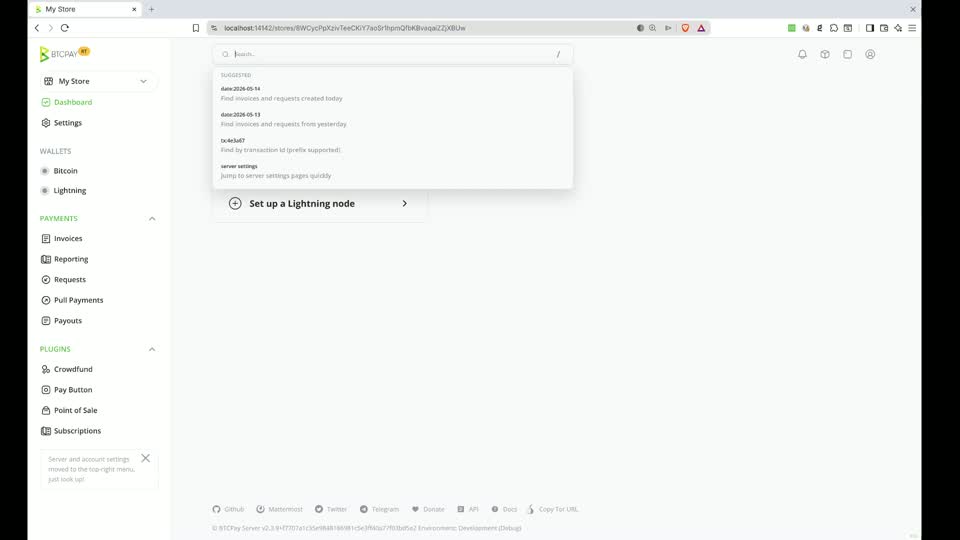
Plugins can add navigation shortcuts and searchable records to BTCPay Server's global search. Use static results for known routes and a remote provider when results depend on the user's query or application data.
Video: Global search overview (opens new window)
 (opens new window)
# Static results
Static results are sent with the page. The browser uses fuzzy search across
their title, category, and aliases to filter them without a server request.
Register an ActionResultItemViewModel from the plugin's
Execute(IServiceCollection) method:
services.AddStaticSearch(new ActionResultItemViewModel
{
    RequiredPolicy = Policies.CanViewStoreSettings,
    Title = "Configure example",
    Action = nameof(UIExampleController.Index),
    Controller = "UIExample",
    Values = context => new { area = Plugin.Area, storeId = context.Store!.Id },
    Category = "Store",
    Aliases = ["Example", "Configure"]
});
The route is generated for the current search context. A store-scoped policy
also prevents the result from being created when no store is selected. Set
RequiredPolicy for every protected destination; unauthorized results are
removed before the response is returned.
Titles, categories, and aliases registered through AddStaticSearch are
included in BTCPay Server's default translation catalog. Use stable source text
for them. Aliases can be individual words or complete sentences that describe
other ways a user might search for the result.
Use the ResultItemViewModel overload only when the result already has a URL.
ActionResultItemViewModel is preferable for controller actions because its
Values callback can include the active store and plugin area.
# Remote results
When browser-side filtering finds no static match, global search sends the
query to the server. Implement ISearchResultItemProvider for database-backed
or computed results:
public sealed class ExampleSearchProvider(ExampleService examples)
    : ISearchResultItemProvider
{
    public async Task ProvideAsync(
        SearchResultItemProviderContext context,
        CancellationToken cancellationToken)
    {
        if (context.UserQuery is not { Length: > 0 } query ||
            context.Store is null ||
            !await context.IsAuthorized(PluginPolicies.CanViewExample))
            return;

        var limit = context.MaxResult ?? 10;
        foreach (var example in await examples.Search(
                     context.Store.Id, query, limit, cancellationToken))
        {
            context.ItemResults.Add(new ResultItemViewModel
            {
                RequiredPolicy = PluginPolicies.CanViewExample,
                Title = example.Name,
                Category = "Example",
                Url = context.Url.Action(
                    nameof(UIExampleController.View),
                    "UIExample",
                    new { area = Plugin.Area, storeId = context.Store.Id, id = example.Id })
            });
        }
    }
}
Register the provider from the plugin:
services.AddSearchResultItemProvider<ExampleSearchProvider>();
AddSearchResultItemProvider registers the provider as a singleton, so its
dependencies must be safe to resolve from a singleton. Respect
CancellationToken and MaxResult, scope data access to context.Store and
context.UserId, and authorize before querying protected data. Setting
RequiredPolicy on each result provides a final authorization filter but does
not protect a query that has already run.
UserQuery is null while static results are assembled and contains the user's
text for remote search. A provider may support both modes by branching on that
value. Results with a lower Order appear first.